Sources
Cambridge in Colour: Colour Management and Printing series
Underlying concepts and principles: Human Perception; Bit Depth; Basics of digital cameras: pixels
Color Management from camera to display Part 1: Concept and Overview; Part 2: Color Spaces; Part 3: Color Space Conversion; Understanding Gamma Correction
Bit Depth
Every color pixel in a digital image is created through some combination of the three primary colors: red, green, and blue – often referred to as a “color channel”. Bit depth quantifies how many unique colors are available in an image’s color palette in terms of the number of 0’s and 1’s, or “bits,” which are used to specify each color channel (bpc) or per pixel (bpp). Images with higher bit depths can encode more shades or colors – or intensity of values -since there are more combinations of 0’s and 1’s available.
Most color images from digital cameras have 8-bits per channel and so they can use a total of eight 0’s and 1’s. This allows for 28 or 256 different combinations—translating into 256 different intensity values for each primary color. When all three primary colors are combined at each pixel, this allows for as many as 28*3 or 16,777,216 different colors, or “true color.” This is referred to as 24 bits per pixel since each pixel is composed of three 8-bit color channels. The number of colors available for any X-bit image is just 2X if X refers to the bits per pixel and 23X if X refers to the bits per channel. The following table illustrates different image types in terms of bits (bit depth), total colors available, and common names.
| Bits Per Pixel |
Number of Colors Available |
Common Name(s) |
| 1 |
2 |
Monochrome |
| 2 |
4 |
CGA |
| 4 |
16 |
EGA |
| 8 |
256 |
VGA |
| 16 |
65536 |
XGA, High Color |
| 24 |
16777216 |
SVGA, True Color |
| 32 |
16777216 + Transparency |
|
| 48 |
281 Trillion |
|
USEFUL TIPS
- The human eye can only discern about 10 million different colors, so saving an image in any more than 24 bpp is excessive if the only intended purpose is for viewing. On the other hand, images with more than 24 bpp are still quite useful since they hold up better under post-processing (see “Posterization Tutorial“).
- Color gradations in images with less than 8-bits per color channel can be clearly seen in the image histogram.
- The available bit depth settings depend on the file type. Standard JPEG and TIFF files can only use 8-bits and 16-bits per channel, respectively.
BASICS OF DIGITAL CAMERA PIXELS
The continuous advance of digital camera technology can be quite confusing because new terms are constantly being introduced. This tutorial aims to clear up some of this digital pixel confusion — particularly for those who are either considering or have just purchased their first digital camera. Concepts such as sensor size, megapixels, dithering and print size are discussed.
OVERVIEW OF COLOR MANAGEMENT
“Color management” is a process where the color characteristics for every device in the imaging chain is known precisely and utilized in color reproduction. It often occurs behind the scenes and doesn’t require any intervention, but when color problems arise, understanding this process can be critical.
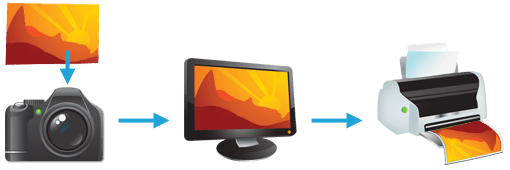
In digital photography, this imaging chain usually starts with the camera and concludes with the final print, and may include a display device in between:
Many other imaging chains exist, but in general, any device which attempts to reproduce color can benefit from color management. For example, with photography it is often critical that your prints or online gallery appear how they were intended. Color management cannot guarantee identical color reproduction, as this is rarely possible, but it can at least give you more control over any changes which may occur.
THE NEED FOR PROFILES & REFERENCE COLORS
Color reproduction has a fundamental problem: a given “color number” doesn’t necessarily produce the same color in all devices. We use an example of spiciness to convey both why this creates a problem, and how it is managed.
Let’s say that you’re at a restaurant and are about to order a spicy dish. Although you enjoy spiciness, your taste buds are quite sensitive, so you want to be careful that you specify a pleasurable amount. The dilemma is this: simply saying “medium” might convey one level of spice to a cook in Thailand, and a completely different level to someone from England. Restaurants could standardize this based on the number of peppers included in the dish, but this alone wouldn’t be sufficient. Spice also depends on how sensitive the taster is to each pepper:
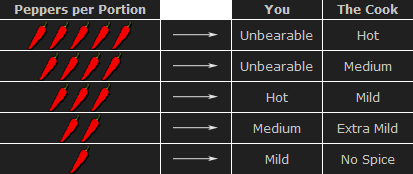
To solve your spiciness dilemma, you could undergo a one-time taste test where you eat a series of dishes, with each containing slightly more peppers (shown above). You could then create a personalized table to carry with you at restaurants which specifies that 3 equals “mild,” 5 equals “medium,” and so on (assuming that all peppers are the same). Next time, when you visit a restaurant and say “medium,” the waiter could look at your personal table and translate this into a standardized concentration of peppers. This waiter could then go to the cook and say to make the dish “extra mild,” knowing all too well what this concentration of peppers would actually mean to the cook.
As a whole, this process involved (1) characterizing each person’s sensitivity to spice, (2)standardizing this spice based on a concentration of peppers and (3) being able to collectively use this information to translate the “medium” value from one person into an “extra mild” value for another. These same three principles are used to manage color.
COLOR PROFILES
A device’s color response is characterized similar to how the personalized spiciness table was created in the above example. Various numbers are sent to this device, and its output is measured in each instance:
| Input Number (Green) |
|
Output Color |
| Device 1 |
Device 2 |
| 200 |
→ |
|
|
| 150 |
→ |
|
|
| 100 |
→ |
|
|
| 50 |
→ |
|
|
Real-world color profiles include all three colors, more values, and are usually more sophisticated than the above table — but the same core principles apply. However, just as with the spiciness example, a profile on its own is insufficient. These profiles have to be recorded in relation to standardized reference colors, and you need color-aware software that can use these profiles to translate color between devices.
COLOR MANAGEMENT OVERVIEW
Putting it all together, the following diagram shows how these concepts might apply when converting color between a display device and a printer:
 |
|
 |
Characterized
Input Device |
|
Standardized
Profile Connection Space |
|
Characterized
Output Device |

RGB
Color Profile
(color space) |
 |
 |
|

CMYK
Color Profile
(color space) |
- Characterize. Every color-managed device requires a personalized table, or “color profile,” which characterizes the color response of that particular device.
- Standardize. Each color profile describes these colors relative to a standardized set of reference colors (the “Profile Connection Space”).
- Translate. Color-managed software then uses these standardized profiles to translate color from one device to another. This is usually performed by a color management module (CMM).
The above color management system was standardized by the International Color Consortium (ICC), and is now used in most computers. It involves several key concepts: color profiles (discussed above), color spaces, and translation between color spaces.
Color Space. This is just a way of referring to the collection of colors/shades that are described by a particular color profile. Put another way, it describes the set of all realizable color combinations. Color spaces are therefore useful tools for understanding the color compatibility between two different devices. See the tutorial on color spaces for more on this topic.
Profile Connection Space (PCS). This is a color space that serves as a standardized reference (a “reference space”), since it is independent of any particular device’s characteristics. The PCS is usually the set of all visible colors defined by the Commission International de l’éclairage (CIE) and used by the ICC.
Note: The thin trapezoidal region drawn within the PCS is what is called a “working space.” The working space is used in image editing programs (such as Adobe Photoshop), and defines the subset of colors available to work with when performing any image editing.
Color Translation. The color management module (CMM) is the workhorse of color management, and is what performs all the calculations needed to translate from one color space into another. Contrary to previous examples, this is rarely a clean and simple process. For example, what if the printer weren’t capable of producing as intense a color as the display device? This is called a “gamut mismatch,” and would mean that accurate reproduction is impossible. In such cases the CMM therefore just has to aim for the best approximation that it can. See the tutorial on color space conversion for more on this topic.
UNDERSTANDING GAMMA CORRECTION
Gamma is an important but seldom understood characteristic of virtually all digital imaging systems. It defines the relationship between a pixel’s numerical value and its actual luminance. Without gamma, shades captured by digital cameras wouldn’t appear as they did to our eyes (on a standard monitor). It’s also referred to as gamma correction, gamma encoding or gamma compression, but these all refer to a similar concept. Understanding how gamma works can improve one’s exposure technique, in addition to helping one make the most of image editing.
WHY GAMMA IS USEFUL
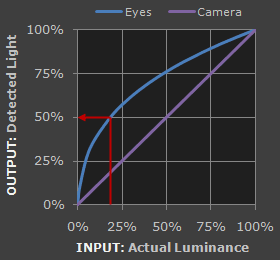
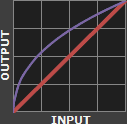
1. Our eyes do not perceive light the way cameras do. With a digital camera, when twice the number of photons hit the sensor, it receives twice the signal (a “linear” relationship). Pretty logical, right? That’s not how our eyes work. Instead, we perceive twice the light as being only a fraction brighter — and increasingly so for higher light intensities (a “nonlinear” relationship).
Compared to a camera, we are much more sensitive to changes in dark tones than we are to similar changes in bright tones. There’s a biological reason for this peculiarity: it enables our vision to operate over a broader range of luminance. Otherwise the typical range in brightness we encounter outdoors would be too overwhelming.
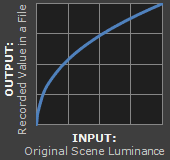
But how does all of this relate to gamma? In this case, gamma is what translates between our eye’s light sensitivity and that of the camera. When a digital image is saved, it’s therefore “gamma encoded” — so that twice the value in a file more closely corresponds to what we would perceive as being twice as bright.
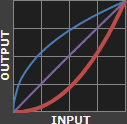
Technical Note: Gamma is defined by Vout = Vingamma , where Vout is the output luminance value and Vin is the input/actual luminance value. This formula causes the blue line above to curve. When gamma<1, the line arches upward, whereas the opposite occurs with gamma>1.
2. Gamma encoded images store tones more efficiently. Since gamma encoding redistributes tonal levels closer to how our eyes perceive them, fewer bits are needed to describe a given tonal range. Otherwise, an excess of bits would be devoted to describe the brighter tones (where the camera is relatively more sensitive), and a shortage of bits would be left to describe the darker tones (where the camera is relatively less sensitive):
Notice how the linear encoding uses insufficient levels to describe the dark tones — even though this leads to an excess of levels to describe the bright tones. On the other hand, the gamma encoded gradient distributes the tones roughly evenly across the entire range (“perceptually uniform”). This also ensures that subsequent image editing, color andhistograms are all based on natural, perceptually uniform tones.
However, real-world images typically have at least 256 levels (8 bits), which is enough to make tones appear smooth and continuous in a print. If linear encoding were used instead, 8X as many levels (11 bits) would’ve been required to avoid image posterization.
GAMMA WORKFLOW: ENCODING & CORRECTION
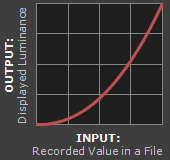
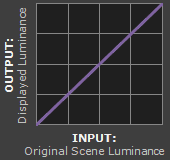
Despite all of these benefits, gamma encoding adds a layer of complexity to the whole process of recording and displaying images. The next step is where most people get confused, so take this part slowly. A gamma encoded image has to have “gamma correction” applied when it is viewed — which effectively converts it back into light from the original scene. In other words, the purpose of gamma encoding is for recording the image — not for displaying the image. Fortunately this second step (the “display gamma”) is automatically performed by your monitor and video card. The following diagram illustrates how all of this fits together:
1. Image Gamma. This is applied either by your camera or RAW development software whenever a captured image is converted into a standard JPEG or TIFF file. It redistributes native camera tonal levels into ones which are more perceptually uniform, thereby making the most efficient use of a given bit depth.
2. Display Gamma. This refers to the net influence of your video card and display device, so it may in fact be comprised of several gammas. The main purpose of the display gamma is to compensate for a file’s gamma — thereby ensuring that the image isn’t unrealistically brightened when displayed on your screen. A higher display gamma results in a darker image with greater contrast.
3. System Gamma. This represents the net effect of all gamma values that have been applied to an image, and is also referred to as the “viewing gamma.” For faithful reproduction of a scene, this should ideally be close to a straight line (gamma = 1.0). A straight line ensures that the input (the original scene) is the same as the output (the light displayed on your screen or in a print). However, the system gamma is sometimes set slightly greater than 1.0 in order to improve contrast. This can help compensate for limitations due to the dynamic range of a display device, or due to non-ideal viewing conditions and image flare.
IMAGE FILE GAMMA
The precise image gamma is usually specified by a color profile that is embedded within the file. Most image files use an encoding gamma of 1/2.2 (such as those using sRGB and Adobe RGB 1998 color), but the big exception is with RAW files, which use a linear gamma. However, RAW image viewers typically show these presuming a standard encoding gamma of 1/2.2, since they would otherwise appear too dark:
 Linear RAW Image
(image gamma = 1.0)
 Gamma Encoded Image
(image gamma = 1/2.2)
If no color profile is embedded, then a standard gamma of 1/2.2 is usually assumed. Files without an embedded color profile typically include many PNG and GIF files, in addition to some JPEG images that were created using a “save for the web” setting.
Technical Note on Camera Gamma. Most digital cameras record light linearly, so their gamma is assumed to be 1.0, but near the extreme shadows and highlights this may not hold true. In that case, the file gamma may represent a combination of the encoding gamma and the camera’s gamma. However, the camera’s gamma is usually negligible by comparison. Camera manufacturers might also apply subtle tonal curves, which can also impact a file’s gamma.
DISPLAY GAMMA
This is the gamma that you are controlling when you perform monitor calibration and adjust your contrast setting. Fortunately, the industry has converged on a standard display gamma of 2.2, so one doesn’t need to worry about the pros/cons of different values. Older macintosh computers used a display gamma of 1.8, which made non-mac images appear brighter relative to a typical PC, but this is no longer the case.
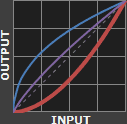
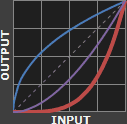
Recall that the display gamma compensates for the image file’s gamma, and that the net result of this compensation is the system/overall gamma. For a standard gamma encoded image file (—), changing the display gamma (—) will therefore have the following overall impact (—) on an image:
Diagrams assume that your display has been calibrated to a standard gamma of 2.2.
Recall from before that the image file gamma (—) plus the display gamma (—) equals the overall system gamma (—). Also note how higher gamma values cause the red curve to bend downward.
If you’re having trouble following the above charts, don’t despair! It’s a good idea to first have an understanding of how tonal curves impact image brightness and contrast. Otherwise you can just look at the portrait images for a qualitative understanding.
How to interpret the charts. The first picture (far left) gets brightened substantially because the image gamma (—) is uncorrected by the display gamma (—), resulting in an overall system gamma (—) that curves upward. In the second picture, the display gamma doesn’t fully correct for the image file gamma, resulting in an overall system gamma that still curves upward a little (and therefore still brightens the image slightly). In the third picture, the display gamma exactly corrects the image gamma, resulting in an overall linear system gamma. Finally, in the fourth picture the display gamma over-compensates for the image gamma, resulting in an overall system gamma that curves downward (thereby darkening the image).
The overall display gamma is actually comprised of (i) the native monitor/LCD gamma and (ii) any gamma corrections applied within the display itself or by the video card. However, the effect of each is highly dependent on the type of display device.
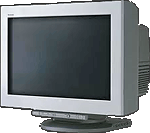 |
|
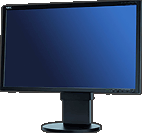 |
| CRT Monitors |
LCD (Flat Panel) Monitors |
CRT Monitors. Due to an odd bit of engineering luck, the native gamma of a CRT is 2.5 — almost the inverse of our eyes. Values from a gamma-encoded file could therefore be sent straight to the screen and they would automatically be corrected and appear nearly OK. However, a small gamma correction of ~1/1.1 needs to be applied to achieve an overall display gamma of 2.2. This is usually already set by the manufacturer’s default settings, but can also be set during monitor calibration.
LCD Monitors. LCD monitors weren’t so fortunate; ensuring an overall display gamma of 2.2 often requires substantial corrections, and they are also much less consistent than CRT’s. LCDs therefore require something called a look-up table (LUT) in order to ensure that input values are depicted using the intended display gamma (amongst other things). See the tutorial on monitor calibration: look-up tables for more on this topic.
Technical Note: The display gamma can be a little confusing because this term is often used interchangeably with gamma correction, since it corrects for the file gamma. However, the values given for each are not always equivalent. Gamma correction is sometimes specified in terms of the encoding gamma that it aims to compensate for — not the actual gamma that is applied. For example, the actual gamma applied with a “gamma correction of 1.5” is often equal to 1/1.5, since a gamma of 1/1.5 cancels a gamma of 1.5 (1.5 * 1/1.5 = 1.0). A higher gamma correction value might therefore brighten the image (the opposite of a higher display gamma).
OTHER NOTES & FURTHER READING
Other important points and clarifications are listed below.
- Dynamic Range. In addition to ensuring the efficient use of image data, gamma encoding also actually increases the recordable dynamic range for a given bit depth. Gamma can sometimes also help a display/printer manage its limited dynamic range (compared to the original scene) by improving image contrast.
- Gamma Correction. The term “gamma correction” is really just a catch-all phrase for when gamma is applied to offset some other earlier gamma. One should therefore probably avoid using this term if the specific gamma type can be referred to instead.
- Gamma Compression & Expansion. These terms refer to situations where the gamma being applied is less than or greater than one, respectively. A file gamma could therefore be considered gamma compression, whereas a display gamma could be considered gamma expansion.
- Applicability. Strictly speaking, gamma refers to a tonal curve which follows a simple power law (where Vout = Vingamma), but it’s often used to describe other tonal curves. For example, the sRGB color space is actually linear at very low luminosity, but then follows a curve at higher luminosity values. Neither the curve nor the linear region follow a standard gamma power law, but the overall gamma is approximated as 2.2.
- Is Gamma Required? No, linear gamma (RAW) images would still appear as our eyes saw them — but only if these images were shown on a linear gamma display. However, this would negate gamma’s ability to efficiently record tonal levels.
For more on this topic, also visit the following tutorials:
!!
Color can only exist when three components are present: a viewer, an object, and light. Although pure white light is perceived as colorless, it actually contains all colors in the visible spectrum. When white light hits an object, it selectively blocks some colors and reflects others; only the reflected colors contribute to the viewer’s perception of color.
Human Vision
The human eye senses this spectrum using a combination of rod and cone cells for vision. Rod cells are better for low-light vision, but can only sense the intensity of light, whereas whilecone cells can also discern color, they function best in bright light.
Three types of cone cells exist in your eye, with each being more sensitive to either short (S), medium (M), or long (L) wavelength light. The set of signals possible at all three cone cells describes the range of colors we can see with our eyes. The diagram below illustrates the relative sensitivity of each type of cell for the entire visible spectrum. These curves are often also referred to as the “tristimulus functions.”
| Select View: |
Cone Cells |
Luminosity |
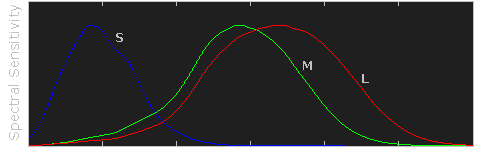


Raw data courtesy of the Colour and Vision Research Laboratories (CVRL), UCL.
Note how each type of cell does not just sense one color, but instead has varying degrees of sensitivity across a broad range of wavelengths. Move your mouse over “luminosity” to see which colors contribute the most towards our perception of brightness. Also note how human color perception is most sensitive to light in the yellow-green region of the spectrum; this is utilized by the bayer array in modern digital cameras.
ADDITIVE & SUBTRACTIVE COLOR MIXING
Virtually all our visible colors can be produced by utilizing some combination of the three primary colors, either by additive or subtractive processes. Additive processes create color by adding light to a dark background, whereas subtractive processes use pigments or dyes to selectively block white light. A proper understanding of each of these processes creates the basis for understanding color reproduction.
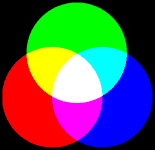 Additive
 Subtractive
The color in the three outer circles are termed primary colors, and are different in each of the above diagrams. Devices which use these primary colors can produce the maximum range of color. Monitors release light to produce additive colors, whereas printers use pigments or dyes to absorb light and create subtractive colors. This is why nearly all monitors use a combination of red, green and blue (RGB) pixels, whereas most color printers use at least cyan, magenta and yellow (CMY) inks. Many printers also include black ink in addition to cyan, magenta and yellow (CMYK) because CMY alone cannot produce deep enough shadows.
Additive Color Mixing
(RGB Color) |
|
Subtractive Color Mixing
(CMYK Color) |
| Red + Green |
→ |
Yellow |
Cyan + Magenta |
→ |
Blue |
| Green + Blue |
→ |
Cyan |
Magenta + Yellow |
→ |
Red |
| Blue + Red |
→ |
Magenta |
Yellow + Cyan |
→ |
Green |
| Red + Green + Blue |
→ |
White |
Cyan + Magenta + Yellow |
→ |
Black |
Subtractive processes are more susceptible to changes in ambient light, because this light is what becomes selectively blocked to produce all their colors. This is why printed color processes require a specific type of ambient lighting in order to accurately depict colors.
COLOR PROPERTIES: HUE & SATURATION
Color has two unique components that set it apart from achromatic light: hue and saturation. Visually describing a color based on each of these terms can be highly subjective, however each can be more objectively illustrated by inspecting the light’s color spectrum.
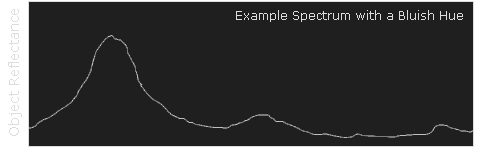
Naturally occurring colors are not just light at one wavelength, but actually contain a whole range of wavelengths. A color’s “hue” describes which wavelength appears to be most dominant. The object whose spectrum is shown below would likely be perceived as bluish, even though it contains wavelengths throughout the spectrum.
Although this spectrum’s maximum happens to occur in the same region as the object’s hue, it is not a requirement. If this object instead had separate and pronounced peaks in just the the red and green regions, then its hue would instead be yellow (see the additive color mixing table).
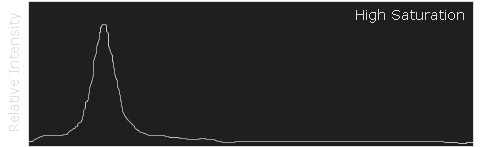
A color’s saturation is a measure of its purity. A highly saturated color will contain a very narrow set of wavelengths and appear much more pronounced than a similar, but less saturated color. The following example illustrates the spectrum for both a highly saturated and less saturated shade of blue.
| Select Saturation Level: |
Low |
High |
—————————————————-
To be reviewed and updated together with work on Book Design 1.
Sources
Cambridge in Colour: Colour Management and Printing series
Underlying concepts and principles: Human Perception; Bit Depth; Basics of digital cameras: pixels
Color Management from camera to display Part 1: Concept and Overview; Part 2: Color Spaces; Part 3: Color Space Conversion; Understanding Gamma Correction
Bit Depth
Every color pixel in a digital image is created through some combination of the three primary colors: red, green, and blue – often referred to as a “color channel”. Bit depth quantifies how many unique colors are available in an image’s color palette in terms of the number of 0’s and 1’s, or “bits,” which are used to specify each color channel (bpc) or per pixel (bpp). Images with higher bit depths can encode more shades or colors – or intensity of values -since there are more combinations of 0’s and 1’s available.
Most color images from digital cameras have 8-bits per channel and so they can use a total of eight 0’s and 1’s. This allows for 28 or 256 different combinations—translating into 256 different intensity values for each primary color. When all three primary colors are combined at each pixel, this allows for as many as 28*3 or 16,777,216 different colors, or “true color.” This is referred to as 24 bits per pixel since each pixel is composed of three 8-bit color channels. The number of colors available for any X-bit image is just 2X if X refers to the bits per pixel and 23X if X refers to the bits per channel. The following table illustrates different image types in terms of bits (bit depth), total colors available, and common names.
| Bits Per Pixel |
Number of Colors Available |
Common Name(s) |
| 1 |
2 |
Monochrome |
| 2 |
4 |
CGA |
| 4 |
16 |
EGA |
| 8 |
256 |
VGA |
| 16 |
65536 |
XGA, High Color |
| 24 |
16777216 |
SVGA, True Color |
| 32 |
16777216 + Transparency |
|
| 48 |
281 Trillion |
|
USEFUL TIPS
- The human eye can only discern about 10 million different colors, so saving an image in any more than 24 bpp is excessive if the only intended purpose is for viewing. On the other hand, images with more than 24 bpp are still quite useful since they hold up better under post-processing (see “Posterization Tutorial“).
- Color gradations in images with less than 8-bits per color channel can be clearly seen in the image histogram.
- The available bit depth settings depend on the file type. Standard JPEG and TIFF files can only use 8-bits and 16-bits per channel, respectively.
BASICS OF DIGITAL CAMERA PIXELS
The continuous advance of digital camera technology can be quite confusing because new terms are constantly being introduced. This tutorial aims to clear up some of this digital pixel confusion — particularly for those who are either considering or have just purchased their first digital camera. Concepts such as sensor size, megapixels, dithering and print size are discussed.
OVERVIEW OF COLOR MANAGEMENT
“Color management” is a process where the color characteristics for every device in the imaging chain is known precisely and utilized in color reproduction. It often occurs behind the scenes and doesn’t require any intervention, but when color problems arise, understanding this process can be critical.
In digital photography, this imaging chain usually starts with the camera and concludes with the final print, and may include a display device in between:
Many other imaging chains exist, but in general, any device which attempts to reproduce color can benefit from color management. For example, with photography it is often critical that your prints or online gallery appear how they were intended. Color management cannot guarantee identical color reproduction, as this is rarely possible, but it can at least give you more control over any changes which may occur.
THE NEED FOR PROFILES & REFERENCE COLORS
Color reproduction has a fundamental problem: a given “color number” doesn’t necessarily produce the same color in all devices. We use an example of spiciness to convey both why this creates a problem, and how it is managed.
Let’s say that you’re at a restaurant and are about to order a spicy dish. Although you enjoy spiciness, your taste buds are quite sensitive, so you want to be careful that you specify a pleasurable amount. The dilemma is this: simply saying “medium” might convey one level of spice to a cook in Thailand, and a completely different level to someone from England. Restaurants could standardize this based on the number of peppers included in the dish, but this alone wouldn’t be sufficient. Spice also depends on how sensitive the taster is to each pepper:
To solve your spiciness dilemma, you could undergo a one-time taste test where you eat a series of dishes, with each containing slightly more peppers (shown above). You could then create a personalized table to carry with you at restaurants which specifies that 3 equals “mild,” 5 equals “medium,” and so on (assuming that all peppers are the same). Next time, when you visit a restaurant and say “medium,” the waiter could look at your personal table and translate this into a standardized concentration of peppers. This waiter could then go to the cook and say to make the dish “extra mild,” knowing all too well what this concentration of peppers would actually mean to the cook.
As a whole, this process involved (1) characterizing each person’s sensitivity to spice, (2)standardizing this spice based on a concentration of peppers and (3) being able to collectively use this information to translate the “medium” value from one person into an “extra mild” value for another. These same three principles are used to manage color.
COLOR PROFILES
A device’s color response is characterized similar to how the personalized spiciness table was created in the above example. Various numbers are sent to this device, and its output is measured in each instance:
| Input Number (Green) |
|
Output Color |
| Device 1 |
Device 2 |
| 200 |
→ |
|
|
| 150 |
→ |
|
|
| 100 |
→ |
|
|
| 50 |
→ |
|
|
Real-world color profiles include all three colors, more values, and are usually more sophisticated than the above table — but the same core principles apply. However, just as with the spiciness example, a profile on its own is insufficient. These profiles have to be recorded in relation to standardized reference colors, and you need color-aware software that can use these profiles to translate color between devices.
COLOR MANAGEMENT OVERVIEW
Putting it all together, the following diagram shows how these concepts might apply when converting color between a display device and a printer:
|
|
|
Characterized
Input Device |
|
Standardized
Profile Connection Space |
|
Characterized
Output Device |
RGB
Color Profile
(color space) |
|
|
|
CMYK
Color Profile
(color space) |
- Characterize. Every color-managed device requires a personalized table, or “color profile,” which characterizes the color response of that particular device.
- Standardize. Each color profile describes these colors relative to a standardized set of reference colors (the “Profile Connection Space”).
- Translate. Color-managed software then uses these standardized profiles to translate color from one device to another. This is usually performed by a color management module (CMM).
The above color management system was standardized by the International Color Consortium (ICC), and is now used in most computers. It involves several key concepts: color profiles (discussed above), color spaces, and translation between color spaces.
Color Space. This is just a way of referring to the collection of colors/shades that are described by a particular color profile. Put another way, it describes the set of all realizable color combinations. Color spaces are therefore useful tools for understanding the color compatibility between two different devices. See the tutorial on color spaces for more on this topic.
Profile Connection Space (PCS). This is a color space that serves as a standardized reference (a “reference space”), since it is independent of any particular device’s characteristics. The PCS is usually the set of all visible colors defined by the Commission International de l’éclairage (CIE) and used by the ICC.
Note: The thin trapezoidal region drawn within the PCS is what is called a “working space.” The working space is used in image editing programs (such as Adobe Photoshop), and defines the subset of colors available to work with when performing any image editing.
Color Translation. The color management module (CMM) is the workhorse of color management, and is what performs all the calculations needed to translate from one color space into another. Contrary to previous examples, this is rarely a clean and simple process. For example, what if the printer weren’t capable of producing as intense a color as the display device? This is called a “gamut mismatch,” and would mean that accurate reproduction is impossible. In such cases the CMM therefore just has to aim for the best approximation that it can. See the tutorial on color space conversion for more on this topic.
UNDERSTANDING GAMMA CORRECTION
Gamma is an important but seldom understood characteristic of virtually all digital imaging systems. It defines the relationship between a pixel’s numerical value and its actual luminance. Without gamma, shades captured by digital cameras wouldn’t appear as they did to our eyes (on a standard monitor). It’s also referred to as gamma correction, gamma encoding or gamma compression, but these all refer to a similar concept. Understanding how gamma works can improve one’s exposure technique, in addition to helping one make the most of image editing.
WHY GAMMA IS USEFUL
1. Our eyes do not perceive light the way cameras do. With a digital camera, when twice the number of photons hit the sensor, it receives twice the signal (a “linear” relationship). Pretty logical, right? That’s not how our eyes work. Instead, we perceive twice the light as being only a fraction brighter — and increasingly so for higher light intensities (a “nonlinear” relationship).
Compared to a camera, we are much more sensitive to changes in dark tones than we are to similar changes in bright tones. There’s a biological reason for this peculiarity: it enables our vision to operate over a broader range of luminance. Otherwise the typical range in brightness we encounter outdoors would be too overwhelming.
But how does all of this relate to gamma? In this case, gamma is what translates between our eye’s light sensitivity and that of the camera. When a digital image is saved, it’s therefore “gamma encoded” — so that twice the value in a file more closely corresponds to what we would perceive as being twice as bright.
Technical Note: Gamma is defined by Vout = Vingamma , where Vout is the output luminance value and Vin is the input/actual luminance value. This formula causes the blue line above to curve. When gamma<1, the line arches upward, whereas the opposite occurs with gamma>1.
2. Gamma encoded images store tones more efficiently. Since gamma encoding redistributes tonal levels closer to how our eyes perceive them, fewer bits are needed to describe a given tonal range. Otherwise, an excess of bits would be devoted to describe the brighter tones (where the camera is relatively more sensitive), and a shortage of bits would be left to describe the darker tones (where the camera is relatively less sensitive):
Notice how the linear encoding uses insufficient levels to describe the dark tones — even though this leads to an excess of levels to describe the bright tones. On the other hand, the gamma encoded gradient distributes the tones roughly evenly across the entire range (“perceptually uniform”). This also ensures that subsequent image editing, color andhistograms are all based on natural, perceptually uniform tones.
However, real-world images typically have at least 256 levels (8 bits), which is enough to make tones appear smooth and continuous in a print. If linear encoding were used instead, 8X as many levels (11 bits) would’ve been required to avoid image posterization.
GAMMA WORKFLOW: ENCODING & CORRECTION
Despite all of these benefits, gamma encoding adds a layer of complexity to the whole process of recording and displaying images. The next step is where most people get confused, so take this part slowly. A gamma encoded image has to have “gamma correction” applied when it is viewed — which effectively converts it back into light from the original scene. In other words, the purpose of gamma encoding is for recording the image — not for displaying the image. Fortunately this second step (the “display gamma”) is automatically performed by your monitor and video card. The following diagram illustrates how all of this fits together:
1. Image Gamma. This is applied either by your camera or RAW development software whenever a captured image is converted into a standard JPEG or TIFF file. It redistributes native camera tonal levels into ones which are more perceptually uniform, thereby making the most efficient use of a given bit depth.
2. Display Gamma. This refers to the net influence of your video card and display device, so it may in fact be comprised of several gammas. The main purpose of the display gamma is to compensate for a file’s gamma — thereby ensuring that the image isn’t unrealistically brightened when displayed on your screen. A higher display gamma results in a darker image with greater contrast.
3. System Gamma. This represents the net effect of all gamma values that have been applied to an image, and is also referred to as the “viewing gamma.” For faithful reproduction of a scene, this should ideally be close to a straight line (gamma = 1.0). A straight line ensures that the input (the original scene) is the same as the output (the light displayed on your screen or in a print). However, the system gamma is sometimes set slightly greater than 1.0 in order to improve contrast. This can help compensate for limitations due to the dynamic range of a display device, or due to non-ideal viewing conditions and image flare.
IMAGE FILE GAMMA
The precise image gamma is usually specified by a color profile that is embedded within the file. Most image files use an encoding gamma of 1/2.2 (such as those using sRGB and Adobe RGB 1998 color), but the big exception is with RAW files, which use a linear gamma. However, RAW image viewers typically show these presuming a standard encoding gamma of 1/2.2, since they would otherwise appear too dark:
Linear RAW Image
(image gamma = 1.0)
Gamma Encoded Image
(image gamma = 1/2.2)
If no color profile is embedded, then a standard gamma of 1/2.2 is usually assumed. Files without an embedded color profile typically include many PNG and GIF files, in addition to some JPEG images that were created using a “save for the web” setting.
Technical Note on Camera Gamma. Most digital cameras record light linearly, so their gamma is assumed to be 1.0, but near the extreme shadows and highlights this may not hold true. In that case, the file gamma may represent a combination of the encoding gamma and the camera’s gamma. However, the camera’s gamma is usually negligible by comparison. Camera manufacturers might also apply subtle tonal curves, which can also impact a file’s gamma.
DISPLAY GAMMA
This is the gamma that you are controlling when you perform monitor calibration and adjust your contrast setting. Fortunately, the industry has converged on a standard display gamma of 2.2, so one doesn’t need to worry about the pros/cons of different values. Older macintosh computers used a display gamma of 1.8, which made non-mac images appear brighter relative to a typical PC, but this is no longer the case.
Recall that the display gamma compensates for the image file’s gamma, and that the net result of this compensation is the system/overall gamma. For a standard gamma encoded image file (—), changing the display gamma (—) will therefore have the following overall impact (—) on an image:
Diagrams assume that your display has been calibrated to a standard gamma of 2.2.
Recall from before that the image file gamma (—) plus the display gamma (—) equals the overall system gamma (—). Also note how higher gamma values cause the red curve to bend downward.
If you’re having trouble following the above charts, don’t despair! It’s a good idea to first have an understanding of how tonal curves impact image brightness and contrast. Otherwise you can just look at the portrait images for a qualitative understanding.
How to interpret the charts. The first picture (far left) gets brightened substantially because the image gamma (—) is uncorrected by the display gamma (—), resulting in an overall system gamma (—) that curves upward. In the second picture, the display gamma doesn’t fully correct for the image file gamma, resulting in an overall system gamma that still curves upward a little (and therefore still brightens the image slightly). In the third picture, the display gamma exactly corrects the image gamma, resulting in an overall linear system gamma. Finally, in the fourth picture the display gamma over-compensates for the image gamma, resulting in an overall system gamma that curves downward (thereby darkening the image).
The overall display gamma is actually comprised of (i) the native monitor/LCD gamma and (ii) any gamma corrections applied within the display itself or by the video card. However, the effect of each is highly dependent on the type of display device.
|
|
|
| CRT Monitors |
LCD (Flat Panel) Monitors |
CRT Monitors. Due to an odd bit of engineering luck, the native gamma of a CRT is 2.5 — almost the inverse of our eyes. Values from a gamma-encoded file could therefore be sent straight to the screen and they would automatically be corrected and appear nearly OK. However, a small gamma correction of ~1/1.1 needs to be applied to achieve an overall display gamma of 2.2. This is usually already set by the manufacturer’s default settings, but can also be set during monitor calibration.
LCD Monitors. LCD monitors weren’t so fortunate; ensuring an overall display gamma of 2.2 often requires substantial corrections, and they are also much less consistent than CRT’s. LCDs therefore require something called a look-up table (LUT) in order to ensure that input values are depicted using the intended display gamma (amongst other things). See the tutorial on monitor calibration: look-up tables for more on this topic.
Technical Note: The display gamma can be a little confusing because this term is often used interchangeably with gamma correction, since it corrects for the file gamma. However, the values given for each are not always equivalent. Gamma correction is sometimes specified in terms of the encoding gamma that it aims to compensate for — not the actual gamma that is applied. For example, the actual gamma applied with a “gamma correction of 1.5” is often equal to 1/1.5, since a gamma of 1/1.5 cancels a gamma of 1.5 (1.5 * 1/1.5 = 1.0). A higher gamma correction value might therefore brighten the image (the opposite of a higher display gamma).
OTHER NOTES & FURTHER READING
Other important points and clarifications are listed below.
- Dynamic Range. In addition to ensuring the efficient use of image data, gamma encoding also actually increases the recordable dynamic range for a given bit depth. Gamma can sometimes also help a display/printer manage its limited dynamic range (compared to the original scene) by improving image contrast.
- Gamma Correction. The term “gamma correction” is really just a catch-all phrase for when gamma is applied to offset some other earlier gamma. One should therefore probably avoid using this term if the specific gamma type can be referred to instead.
- Gamma Compression & Expansion. These terms refer to situations where the gamma being applied is less than or greater than one, respectively. A file gamma could therefore be considered gamma compression, whereas a display gamma could be considered gamma expansion.
- Applicability. Strictly speaking, gamma refers to a tonal curve which follows a simple power law (where Vout = Vingamma), but it’s often used to describe other tonal curves. For example, the sRGB color space is actually linear at very low luminosity, but then follows a curve at higher luminosity values. Neither the curve nor the linear region follow a standard gamma power law, but the overall gamma is approximated as 2.2.
- Is Gamma Required? No, linear gamma (RAW) images would still appear as our eyes saw them — but only if these images were shown on a linear gamma display. However, this would negate gamma’s ability to efficiently record tonal levels.
For more on this topic, also visit the following tutorials: